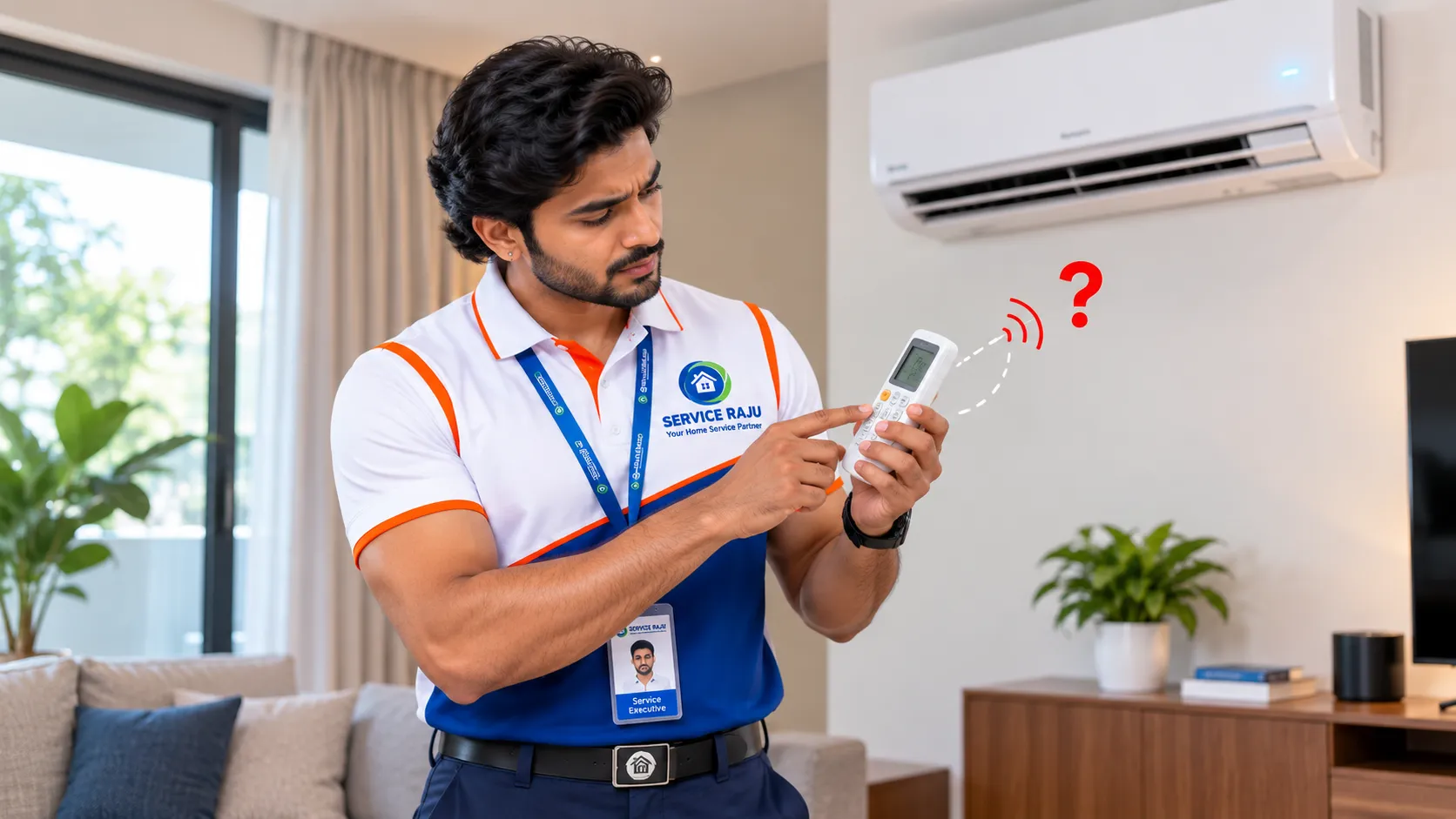
AC Remote Not Working? Safe Checks Before Booking Repair in Mysore
Does your air conditioner turn on only when you press its button on the indoor unit, but refuse to respond to the remote? Or does the remote display appear normal while the AC ignores your commands?
An unresponsive AC remote can be caused by simple issues such as weak batteries, incorrect settings or a blocked signal path. In other cases, the remote itself or the air conditioner's signal receiver may need professional attention.
Before booking AC remote control repair, try these safe checks. They can help you identify a basic problem and explain the symptoms clearly if you need an AC technician in Mysore.
Safety first: These checks are limited to the remote, its settings and simple external observations. Do not open the AC indoor unit, touch wiring, remove electrical covers or attempt to repair internal components.
Quick Checks When the AC Remote Stops Working
Start with the simplest checks and test the AC after each step. Remote designs differ by brand and model, so consult your air conditioner's user manual if a button or setting is unfamiliar.
- Check whether the remote display turns on when you press a button.
- Replace weak batteries with a fresh matching set, observing the + and − markings.
- Make sure the remote is intended for your AC model.
- Point the remote toward the indoor unit's signal receiver without obstacles in the way.
- Check whether a lock symbol or unusual mode is shown on the display.
- Observe whether the indoor unit gives a beep or other response when a command is sent.
If the AC still does not respond, continue with the checks below. Manufacturer troubleshooting guidance also identifies battery condition, remote compatibility, receiver obstruction and possible remote faults as common areas to investigate. See the LG India AC remote troubleshooting guide.
1. Check and Replace the Batteries
Weak or discharged batteries are one of the first things to rule out when an AC remote becomes unresponsive.
What to do
- Open the remote's battery compartment using its normal cover.
- Check the battery type specified on the remote or in its manual.
- Insert a fresh matching set, aligning the positive and negative ends correctly.
- Close the cover and press a button while pointing the remote toward the AC.
Use batteries of the type recommended by the manufacturer. Do not mix old and new batteries or different battery types.
Look for battery leakage
If you see corrosion, powder or signs of battery leakage inside the compartment, avoid touching the residue with bare hands. Do not try to scrape it out with a metal tool. Stop using the remote and seek appropriate advice about replacing it or having it safely assessed.
If the display remains blank after correctly installing fresh batteries, the remote may have a fault or may require replacement. Confirm the compatible remote model before buying one.
2. Check the Remote's Settings
Sometimes the remote is transmitting a command, but the selected setting is not what you expect. The exact buttons and symbols vary between AC brands.
Check the operating mode
For cooling, make sure the remote is set to the cooling mode shown in your model's manual—often represented by a snowflake symbol. If it is set to Fan, Dry or another mode, the AC may behave differently from what you expect.
Check the temperature setting
Set a reasonable cooling temperature and wait briefly to see whether the indoor unit responds. A displayed temperature alone does not prove that the AC has received the command.
Look for a lock symbol
Some remotes have a keypad-lock function. If a lock symbol appears, consult the model's manual for the correct unlocking sequence. Avoid trying random button combinations, as these can change other settings.
Confirm the remote is compatible
A universal or replacement remote may not support every feature of your AC. If the remote was recently replaced, verify that it is compatible with the exact model and that any required setup has been completed.
3. Check the Signal Path and Receiver Area
Many AC remotes use an infrared signal. The remote generally needs to be aimed toward the receiver on the indoor unit, and the signal path should not be blocked.
- Move objects that may be blocking the indoor unit's receiver area.
- Point the remote toward the AC from a normal operating distance.
- Try from a different position in the room.
- Use a soft, dry cloth to gently clean the accessible exterior of the remote's signal-transmitter window and the AC's visible receiver area.
Do not spray liquid into the AC receiver or dismantle the indoor unit to reach it. If the receiver area appears damaged or the AC still does not respond, arrange a technician's inspection.
4. Try a Phone-Camera Signal Test
Some smartphone cameras can show the infrared light emitted by a remote. This can provide a rough indication of whether the remote is sending a signal, but it is not a definitive diagnostic test.
How to try it
- Open your phone's camera app.
- Point the remote's signal-transmitter end toward the camera lens.
- Press a remote button and look for a flashing light on the phone screen.
- If you do not see a flash, try another camera if available.
Important limitation: Some phone cameras filter infrared light, so a working remote may not show a visible flash. A visible flash also does not confirm that the signal is compatible with, or successfully received by, your AC. If the result is unclear, do not treat it as proof that a particular component has failed.
What the Symptoms May Indicate
| What you notice | Possible explanation | Next safe step |
|---|---|---|
| Remote display is blank | Weak batteries, incorrect battery placement or remote fault | Check the battery type and polarity; try a fresh matching set. |
| Display works, but AC does not respond | Incorrect setting, blocked signal path, compatibility issue or receiver/remote fault | Check mode, aim and compatibility; book an inspection if it persists. |
| Only some buttons work | Feature limitations, a setting issue or a possible button/remote fault | Check the manual and test basic power and temperature commands. |
| AC responds only from very close range | Possible weak remote signal, obstruction or receiver issue | Try fresh batteries and a clear line of sight; seek diagnosis if unchanged. |
| AC responds to a command but does not cool properly | The remote may be working; the cooling problem may be separate | Book AC service and describe the cooling symptoms too. |
These are possible explanations, not a diagnosis. The actual cause depends on the AC model and the results of a technician's checks.
When to Book Professional AC Repair in Mysore
Consider booking a qualified AC technician if:
- The remote remains unresponsive after the basic battery and setting checks.
- You have confirmed the remote is compatible, but the AC does not receive commands.
- The AC's receiver area appears damaged or inaccessible.
- The AC does not respond to its normal controls or shows an error indication.
- The AC has additional symptoms such as unusual noises, burning smells, repeated electrical trips or poor cooling.
If you notice a burning smell, sparks or repeated electrical tripping, stop operating the AC. Do not open electrical covers or repeatedly reset a tripping breaker. Arrange qualified help.
A technician can determine whether the issue is with the remote, the receiver, the AC's control system or a separate operating fault. Internal electrical diagnosis and component repair should be left to qualified professionals.
What to Tell the Technician Before Booking
Sharing a few details can help the service team understand the complaint and prepare for the visit.
- AC brand and model: Check the product label or documentation if it is accessible without opening the unit.
- Remote type: Original remote, replacement remote or universal remote.
- Display condition: Blank, faint, normal or showing a lock symbol/error.
- What you have tried: Battery replacement, mode check, line-of-sight test or phone-camera test.
- AC response: Beep, indicator change, no response or response only from close range.
- Other symptoms: Cooling issue, unusual noise, error display or power interruption.
- Location: Your area in Mysore and a suitable appointment window.
Book AC Repair and Services with Service Raju
If your AC remote still does not work after the safe checks, or if the air conditioner has another operating problem, contact Service Raju to enquire about AC repair and service in Mysore.
Explain what happens when you press the remote buttons and mention any additional AC symptoms. The team can confirm service availability and the next steps for your specific complaint.
Book or enquire:
Service Raju — AC Repair and Services
Call: +91 9964544445
Call: +91 9620550955
Website: www.serviceraju.com
Frequently Asked Questions
1. Why is my AC remote not working even after changing the batteries?
The remote may have a setting or compatibility issue, the signal path may be blocked, or the remote or AC receiver may need inspection. Confirm the batteries are installed correctly and try the other safe checks in this guide.
2. How can I tell whether my AC remote is faulty?
Basic checks may help narrow down the problem, but they cannot conclusively identify a fault. A phone-camera test may show infrared activity on some phones, but it is not reliable for every device or remote. A compatible remote or technician's test may be needed.
3. Can I use a universal remote for my AC?
Some universal remotes work with selected AC models, but compatibility and available functions vary. Check the remote's compatibility information against your AC's exact model before purchasing or programming it.
4. Why does my AC beep but not cool?
A beep may indicate that the AC received a command, but it does not confirm that the cooling system is operating correctly. Check the selected mode and temperature. If cooling remains poor, the issue may require AC service beyond the remote.
5. Is an AC remote sensor problem the same as a remote problem?
No. The remote transmits a command, while the indoor unit has a receiver that detects it. Either side—or a separate control issue—could be involved. A technician can inspect the system and determine the cause.
6. Should I open the AC to check its receiver?
No. Do not open the indoor unit or handle internal wiring or components. Keep troubleshooting to the remote and visible external areas, and contact a qualified technician for internal diagnosis.
Conclusion
An AC remote that stops responding does not always mean the air conditioner needs a major repair. Start with fresh batteries, check the settings, confirm compatibility and make sure the signal path is clear. If the problem continues, professional diagnosis can help identify whether the remote, receiver or another AC component is involved.
For AC repair and service enquiries in Mysore, contact Service Raju and describe the checks you have already tried.
Service Raju — Trusted Home Services in Mysuru, Udupi, Mangaluru & Indore.
 AC Repair
.webp) Ant Control Service
Ant Control Service
 Basin & Sink Services
.webp) Bath & Shower Services
Bath & Shower Services
.webp) Bath Fittings & Mirrors
Bath Fittings & Mirrors
 Bathroom Cleaning Service
 Bathroom Renovation Services
 Bed Bug Control Services
 Bedroom Painting
 Book a Carpenter Consultation
 Book Electrical Consulting
.webp) Cabinet Painting & Wood Refinishing
Cabinet Painting & Wood Refinishing
 Chimney Cleaning
 Civil Masonry Work
 Clean-Up Services
.webp) Clothes Hanger Installation
Clothes Hanger Installation
 Cockroach Control Services
---mysore-mysore-standard-300x200.webp) Commercial Cleaning
Commercial Cleaning
 Commercial Pest Control AMC Service
 Cupboard & Drawer Services
 Decorative Wall Panels
 Deep Sanitisation Service
 Detan & Bleach
 Door, Grill & Cabinet Painting Service
.webp) Doorbell & security
Doorbell & security
 Drain Blockage Clearing
 Electrical Appliance Services
 Electrical Wiring Services
 Empty Home Deep Cleaning
.webp) Fabrication
Fabrication
 Facials
.webp) Fan Installation & Repair
Fan Installation & Repair
 Full Home Cleaning Service
 Full Home Renovation
 Furniture Repair Service
 Gas Stove & Hob Repair
.webp) General Pest Control Services
General Pest Control Services
 General Plumbing & Consultation
 Geyser Repair
 Glass Cleaning
 Head Massage
.webp) Honeybee & Wasp-Services
Honeybee & Wasp-Services
 Kitchen & Bathroom Painting Service
 Kitchen Cleaning
 Kitchen Fittings
.webp) Kitchen Renovation
Kitchen Renovation
.webp) Laptop/Desktop service
Laptop/Desktop service
 Leak Detection and Repair
 LED TV Repair
 Living and Dining Room Painting
 Makeup, Saree & Styling
 Manicure & Pedicure
 MCB,Meter & Fuse Services
 Microwave Repair
 Mosquito Pest Control Service
 Multi-Room Painting Service
 Painting Consultation
 Quick Mini Cleaning Services
 Refrigerator Repair
 RO Water Purifier
.webp) Rodent Control Services (Rat & Mice Treatment)
Rodent Control Services (Rat & Mice Treatment)
.webp) Rooms Cleaning
Rooms Cleaning
 Shelves & Decor
 Sofa, Carpet & Mattress Cleaning
 Solar Water Heater Service
 Sump & Tank Cleaning
 Switch & Socket Services
 Tap & Mixer Service
.webp) Termite-Control-Services
Termite-Control-Services
 Threading & Face Wax
.webp) Tile & Granite Installation & Polishing
Tile & Granite Installation & Polishing
 Toilet & Commode Services
.webp) UPS and Inverter Repair Services
UPS and Inverter Repair Services
.webp) Wall Painting Service
Wall Painting Service
 Washing Machine Repair
 Water Level Controllers
 Water Tank and Pump Repair
 Waterproofing
 Waterproofing Services
 Waxing
 Window & Curtain Services
 Wooden Door Services